
Single cell analysis for dummies - running cell ranger
Running cell ranger
1. Working with publicly available datasets and how to fetch FASTQ files
For publicly available single-cell RNA-seq datasets, the raw sequencing files are often stored in SRA format on sites like NCBI GEO. Before running Cell Ranger, these SRA files need to be downloaded and converted into FASTQ files.
Lets take GSE249131 for example. It opens to the GEO dataset page. scroll down to see SRA Run Selector.
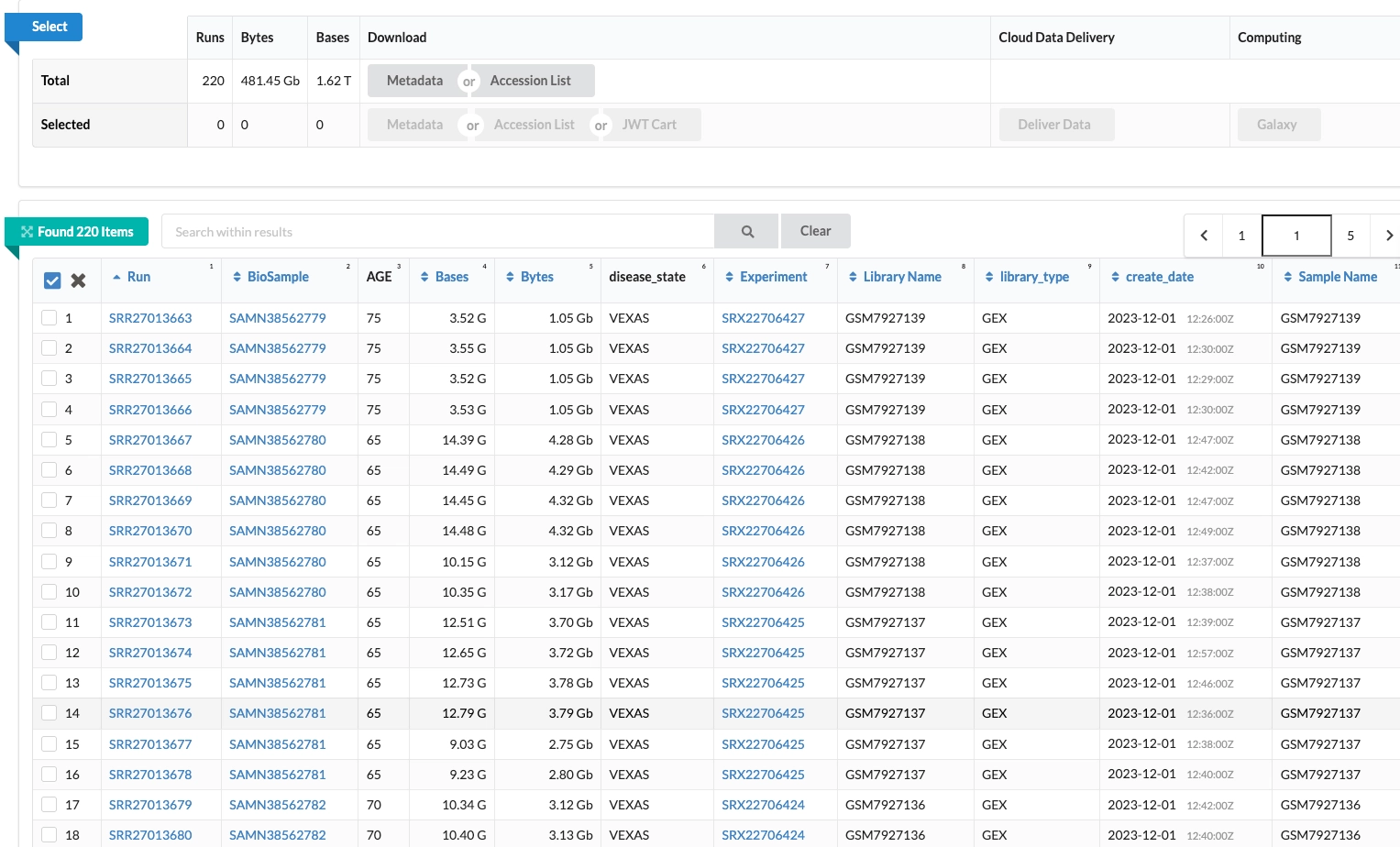
You are led into a page like this. What this is, is the entire raw data of the samples in the dataset.
This data has 66 samples on the whole. but when you look at the SRA files there are about 220.
So, there can be different reasons for this
- Sequencing run: a sample with a lot of reads can be run on multiple lanes
- Repeat sequencing: sample can be sent for repeat sequencing
- Data submission: the files are split up as multiple runs
Now there are different IDs on the table you see in the screenshot.
SRR .. is the SRA nos, they can be unique nos for the different runs of 1 sample
SAMN .. is the Biosample number. Which is unique to a sample
Fetching the fastqs from the srr
Above the SRA table, you see another small table that says metadata or Accession list

Depending on your project you may need to download all the data files or just a few of them. You can download this accession list to feed into your fetch code to get
Now coming to a messy manual selection part if you want only a few samples. Go through the SRA table, this has the information about the samples and their SRR files. You need to map the BioSample with its multiple runs (multiple SRR files), Merge them and then use that to fetch the FASTQ.
If you fail to merge them you will get a separate FASTQ per run and merging the FASTQs will be much more messy. So, merge SRR before.
Coming to the fetching code, what you will need is
- Accession list (.txt) file with the SRR IDs
- SRA Toolkit installed (prefetch, fasterq-dump)
- pigz installed for fast compression (as all these files can be huge)
# get_fastq.py ---> name it however

import os
import subprocess

# 1) Read SRR IDs from a text file
with open("SRR_Acc_List_kosmider.txt") as f: # this is the accession list file
    SRA_NUMBERS = [line.strip() for line in f if line.strip()]

# 2) Download .sra files
for sra_id in SRA_NUMBERS:
    print("Currently downloading:", sra_id)

    prefetch_cmd = f"prefetch {sra_id} -O ." # this is the main command

    print("The command used was:", prefetch_cmd)
    subprocess.call(prefetch_cmd, shell=True)

# 3) Convert each .sra file into FASTQs
for sra_id in SRA_NUMBERS:
    print("Generating FASTQ for:", sra_id)

    # Newer versions of prefetch often save files as:
    # ./SRRxxxx/SRRxxxx.sra
    sra_path = f"./{sra_id}.sra"

    if not os.path.exists(sra_path):
        sra_path = f"./{sra_id}/{sra_id}.sra"

    fastq_cmd = (
        f"fasterq-dump --split-files --include-technical -e 8 -O . {sra_path}"
    ) # this is the cmd that converts to fastq file

    print("The command used was:", fastq_cmd)
    subprocess.call(fastq_cmd, shell=True)

    # 4) Compress FASTQ files if they exist
    for end in ("1", "2", "3", "4"):
        fq = f"{sra_id}_{end}.fastq"

        if os.path.exists(fq):
            subprocess.call(f"pigz -p 8 {fq}", shell=True)
While this may take a LOONGGG time you neednt just run this and stare at the screen.
A more efficient way will be to create a slurm job that does this in the background sends your error alert
#!/bin/bash
#SBATCH --job-name=fastq
#SBATCH --nodes=1
#SBATCH --ntasks=1
#SBATCH --cpus-per-task=24
#SBATCH --mem=64G
#SBATCH --partition=cpu_long
#SBATCH --time=24:00:00
#SBATCH --output=logs/kosmider_gse216548_%j.out
#SBATCH --error=logs/kosmider_gse216548_%j.err
#SBATCH --mail-type=ALL
#SBATCH [email protected]

# load sratoolkit if your cluster uses modules
module load sratoolkit/3.1.0
module load pigz
module load edirect 2>/dev/null || true
export PATH="$HOME/edirect:$PATH"

# make sure logs dir exists
mkdir -p logs

# run your script
python3 get_fastq.py # here just type in the name of your fetching fastq files script
Change the job specs accordingly. You can run longer jobs maybe even 72 hours
The above will generate error files and out files. In case the job breaks you can go check these logs and see what happened and make changes to the code accordingly.
You will need your outputs to be like this
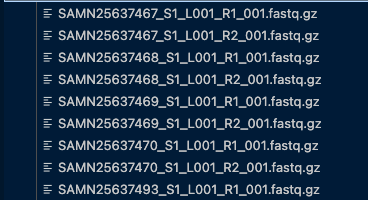
Ive mapped the multiple SRR files with the BioSample ID (SAMN . .)
I faced a major issue here. While fetching fastq
f"fasterq-dump --split-files --include-technical -e 8 -O . {sra_path}"
Here the —include-technical will include technical reads, which we want. So the it may give 3 or 4 output files per sample.
_1 might just be the barcode _2 and _3 are your major output fastq files. Inspect the fastq before the next step
The screenshot above has a very specific naming convention, which is required to run cellranger. It is basically how reads are named on Illumina
Code for the rename:
#!/bin/bash
#!/bin/bash
#SBATCH --time=00:10:00         # 10 minutes should be plenty for renaming
#SBATCH --job-name=rename_fastq
#SBATCH --output=logs/rename_fastq.out
# Rename FASTQ files into Cell Ranger–compatible format

cd "where your fastq are saved" || exit 1

# Read 1 (_2 → R1)
for f in *_2.fastq.gz; do
    base="${f%_2.fastq.gz}";
    mv "$f" "${base}_S1_L001_R1_001.fastq.gz";
done

# Read 2 (_3 → R2)
for f in *_3.fastq.gz; do
    base="${f%_3.fastq.gz}";
    mv "$f" "${base}_S1_L001_R2_001.fastq.gz";
done

echo "All FASTQ files renamed for Cell Ranger."
RUN CELL RANGER
Now that you have everything, you are ready to run cell ranger.
In addition to these fastqs you will need the ref for alignment
Download it from here. you have human, mouse etc ref here
Below is the example for running cellranger for a single sample
#!/bin/bash
#SBATCH --job-name=ai_1
#SBATCH --cpus-per-task=16
#SBATCH --mem=64G
#SBATCH --time=24:00:00
#SBATCH --output=logs/ai_1.out

set -e -o pipefail
set +u
module load cellranger/7.0.1
set -u

cellranger count \
  --id=ai_1 \
  --transcriptome=/gpfs/data/becklab/Personal/rs9522/vexas_public/refdata-gex-GRCh38-2024-A \
  --fastqs=/gpfs/scratch/rs9522/kosmider_gse216548/fastq_renamed \
  --sample=SAMN31440620 \
  --localcores=16 --localmem=64

# you mention the sample name and all the paths correctly
Now, this is a very inefficient way to do it. Because if you have 100 samples, you cannot individually write for each. You can run a script that iterates through all the sample fastqs and generate separate output dirs.
#!/usr/bin/env python3
import csv, os, subprocess
from collections import defaultdict

# --- EDIT THESE PATHS ---
CSV = "/gpfs/scratch/rs9522/kosmider_gse216548/SraRunTable_kosmider.csv"
FASTQ_DIR = "/gpfs/scratch/rs9522/kosmider_gse216548/fastq_renamed"
OUTDIR = "/gpfs/scratch/rs9522/kosmider_gse216548/cellranger_results"  # parent for outputs
REF_HUMAN  = "/gpfs/data/becklab/Personal/rs9522/vexas_public/refdata-gex-GRCh38-2024-A"

os.makedirs(OUTDIR, exist_ok=True)
os.makedirs("logs", exist_ok=True)

def disease_code(s: str) -> str:
    """Map disease text to short code."""
    t = (s or "").lower()
    if "healthy" in t or "control" in t:
        return "hc"
    if "vexas" in t:
        return "vex"
    if "auto" in t and "inflamm" in t:
        return "ai"
    if "myelodysplastic" in t or "mds" in t or "low risk myelo" in t:
        return "mds"
    return "unk"

# Prefer these column names if present
PREF_COLS = {
    "biosample": ["BioSample","biosample","SAMN","Bio Sample"],
    "disease":   ["disease","Disease","diagnosis","Diagnosis","phenotype"],
    "organism":  ["Organism","organism"],
}

def pick(colnames, options):
    opts = [c for c in options if c in colnames]
    return opts[0] if opts else None

with open(CSV, newline="") as fh:
    r = csv.DictReader(fh)
    cols = r.fieldnames or []
    c_bio = pick(cols, PREF_COLS["biosample"]) or "BioSample"
    c_dis = pick(cols, PREF_COLS["disease"])   or "disease"
    c_org = pick(cols, PREF_COLS["organism"])  or "Organism"

    counters = defaultdict(int)     # per-code numbering
    seen_biosamples = set()         # avoid duplicate rows per BioSample

    for row in r:
        biosample = (row.get(c_bio) or "").strip()
        if not biosample or biosample in seen_biosamples:
            continue
        seen_biosamples.add(biosample)

        disease = (row.get(c_dis) or "").strip()
        code = disease_code(disease)
        counters[code] += 1
        short = f"{code}_{counters[code]}"     # e.g., hc_1, mds_2, vex_3, ai_1

        # organism gate (optional; most of this set is human)
        organism = (row.get(c_org) or "").lower()
        ref = REF_HUMAN  # keep simple; swap if you truly have mouse/mixed

        # write & submit a tiny sbatch for each sample
        sh = f"""#!/bin/bash
#SBATCH --job-name={short}
#SBATCH --cpus-per-task=16
#SBATCH --mem=64G
#SBATCH --time=24:00:00
#SBATCH --output=logs/{short}.out

set -e -o pipefail
set +u
module load cellranger/7.0.1
set -u

cellranger count \\
  --id={short} \\
  --transcriptome={ref} \\
  --fastqs={FASTQ_DIR} \\
  --sample={biosample} \\
  --localcores=16 --localmem=64
"""
        sh_name = f"run_{short}.sh"
        with open(sh_name, "w") as f:
            f.write(sh)
        # submit from OUTDIR so each pipeline writes inside OUTDIR/{short}
        env = os.environ.copy()
        # cellranger writes wherever you run the script; cd into OUTDIR for isolation
        with open(sh_name, "r") as f:
            pass
        submit_cmd = f'cd "{OUTDIR}" && sbatch "../{sh_name}"'
        subprocess.run(submit_cmd, shell=True, check=False)

        print(f"Submitted: --id={short} (disease='{disease or 'NA'}', sample={biosample})")
You can even run this as a slrum job where you just call your .py file
your output is going to be neat
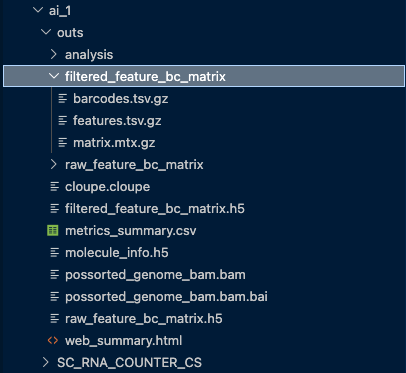
These are your major files and dirs
For scRNA seq, you will only need the filtered_feature_bc_matrix
You will then use the filtered_feature_bc_matrix for your downstream single cell object processing.
Roopini

Roopini is an embryologist with a focus on impact. Nothing brings more happiness for her than that moment of seeing a patient have their baby. She's contributed to research papers and books in embryology.